Clients & portal

One Client Identity, From First Lead to Last Ticket

The same client shows up as a lead, a project stakeholder, and a support requester. CrewForge keeps them as one record, with a passwordless portal where they raise and follow their own tickets.

No credit card. Free up to 10 employees.

01

A clients hub that connects everything

Every client company gets one page: its people, its projects, its leads, and its tickets in a single timeline. No duplicate records, no asking which spreadsheet is current.

  • Client companies with contacts, owner, and notes
  • Unified timeline across projects, leads, and support tickets
  • An account manager per client
  • Sections adapt to the modules you have enabled
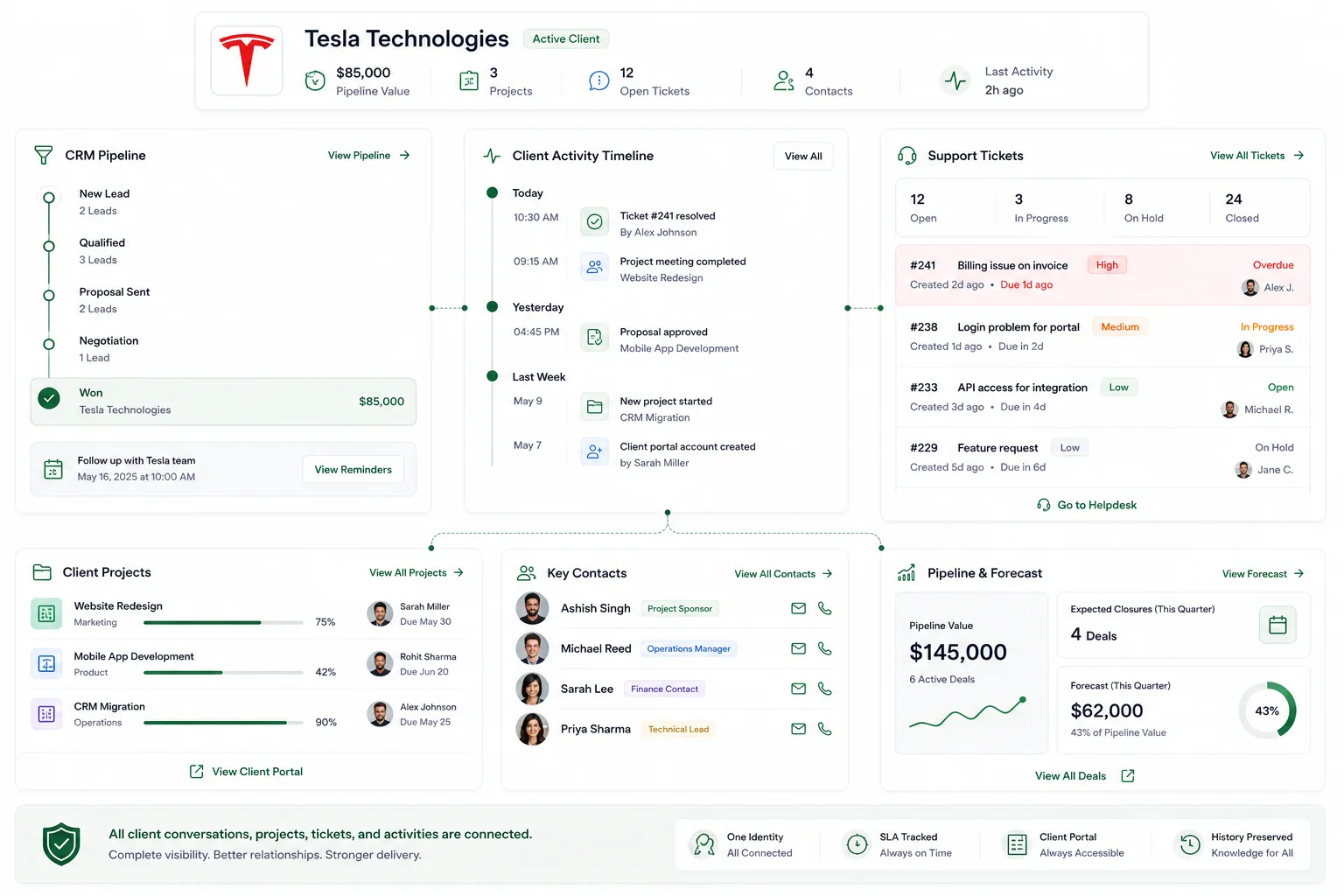
The CrewForge clients hub: one client record with contacts, projects, tickets, activity timeline, and pipeline
02

A portal your clients can use without a manual

Clients sign in with a 6-digit code sent to their email. No passwords to set, forget, or reset. Once in, they raise tickets, follow progress, comment, attach files, and reopen or archive their own requests.

  • Passwordless sign-in with short-lived email codes
  • Clients see their own tickets and public replies only
  • Comment, attach files, reopen, and archive from the portal
  • Portal access is a per-contact switch you control

A portal your clients can use without a manual in CrewForge

feature-client-portal-2 · 1600×1000

03

Deduplicated by design

Every client touchpoint resolves through one email-based identity. Win a lead and the client company and contact are created or matched automatically; add a contact to a project and the client links itself.

  • One contact per email address, per company, always
  • Won leads convert into client records automatically
  • The first project contact links the client company
  • Re-adding a removed contact restores the original record

Deduplicated by design in CrewForge

feature-client-portal-3 · 1600×1000

Small things that matter

Details from daily use, built in because we run on them ourselves.

Email-based dedupe

The same email always resolves to the same person, across CRM, projects, and support.

Per-contact portal switch

Enable portal access person by person, not all or nothing.

Project-scoped visibility

Portal contacts see tickets for their projects, nothing else.

Rate-limited codes

Login codes expire in 15 minutes and requests are throttled.

Client owner

Each client company has an accountable owner on your team.

Unified history

The relationship reads as one story: lead, projects, meetings, tickets.

Frequently asked questions

Do clients need accounts and passwords?

No. Clients sign in to the portal with a 6-digit code sent to their email. The code expires in 15 minutes, and there is no password to manage or reset.

What can a client see in the portal?

Only their own tickets and public replies. Internal team notes are never shown, and a contact only sees tickets for the projects they are linked to.

How does CrewForge avoid duplicate client records?

Every client touchpoint resolves through the contact's email address. Winning a lead, adding a project contact, or receiving a ticket all find or create the same single record.

Run your software company with CrewForge

People, projects, and clients in one system. Free for up to 10 employees.

No credit card. Free up to 10 employees. Or contact our team for a 15 minute walkthrough.