Tasks & projects

Task & Project Management, Connected to Your Team

Assign work, track progress, and keep projects and sprints moving, in the same ERP that holds your people, worklogs, clients, and performance.

No credit card. Free up to 10 employees.

01

From assignment to done

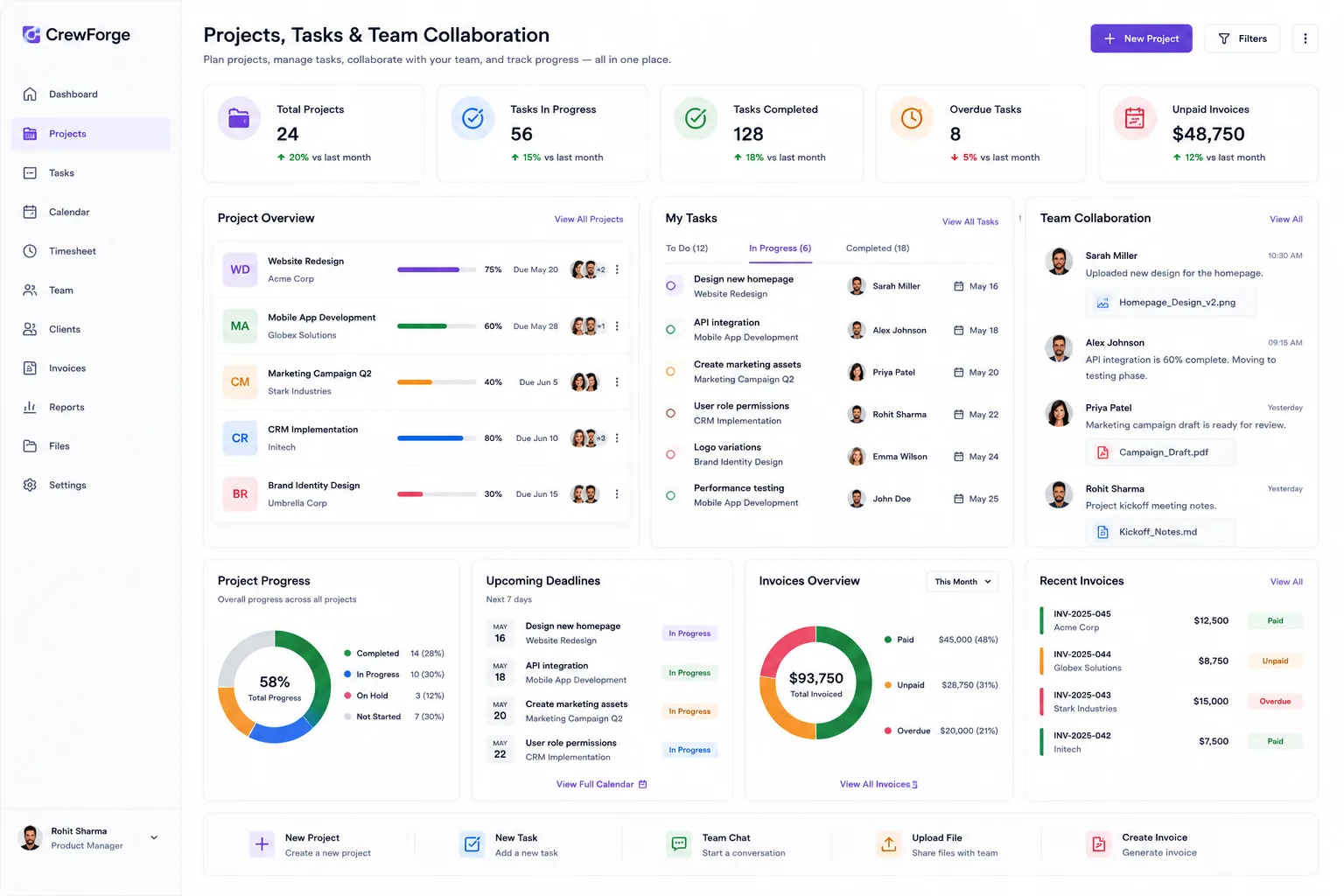
CrewForge keeps tasks and projects visible across the team, with clear ownership, progress, and deadlines, so nothing slips between tools.

  • Task assignment and tracking
  • Project progress visibility
  • Deadlines and milestones
  • Work tied back to each team member
Projects in CrewForge: project overview with progress, tasks by assignee, team collaboration feed, and deadlines
02

Run it your way, projects, sprints, and billing

Manage delivery the way your team works: a tabbed project view for overview, tasks, files, and team, optional agile sprints, and project costing so client work and budgets stay connected.

  • Tabbed project view: overview, tasks, files, team
  • Optional agile sprints and Kanban board
  • Project costing and billing
  • Connected to worklogs and client tickets
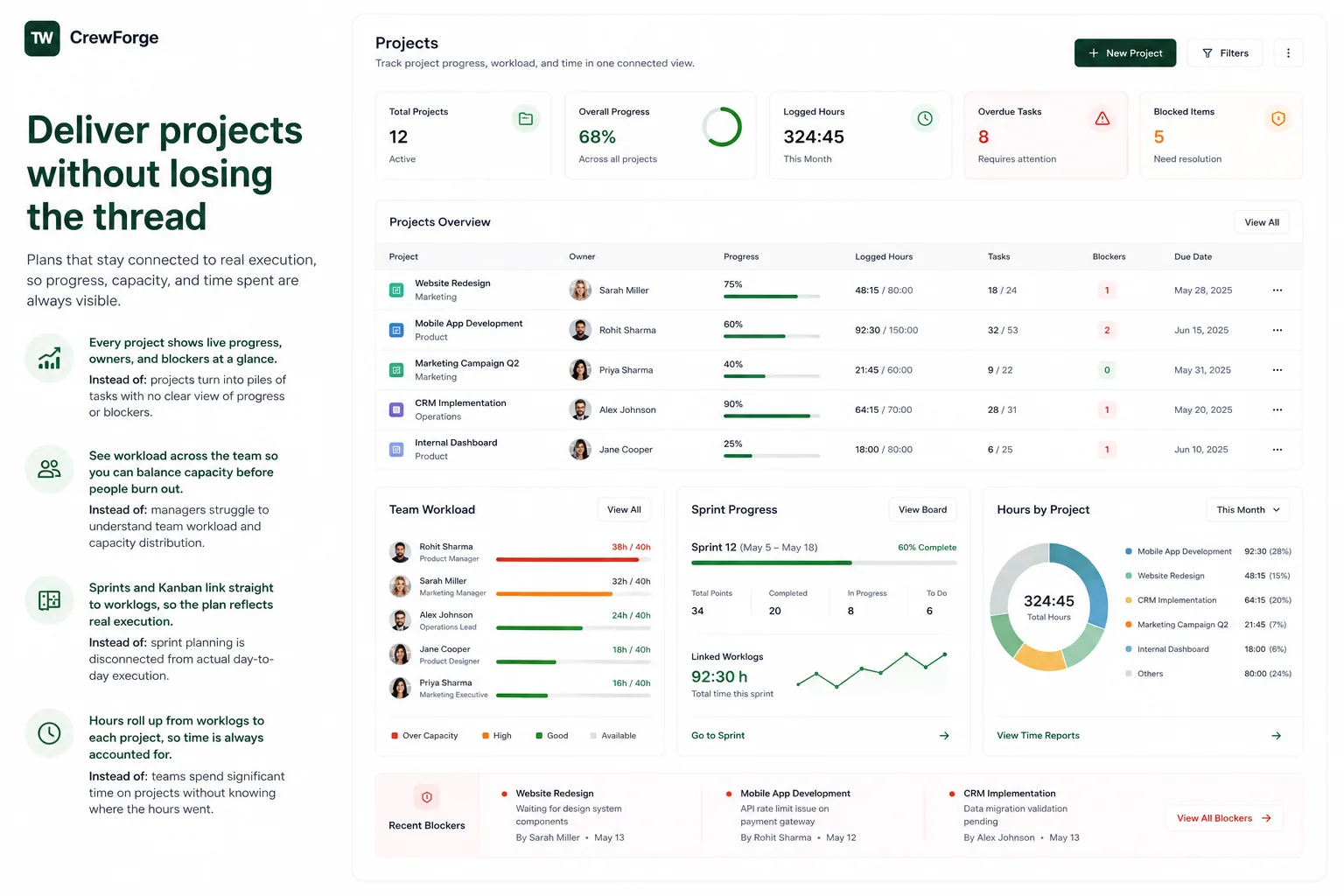
A CrewForge projects dashboard with sprint progress, team workload, and hours by project
03

Budgets, rates, and the profit estimator

Every project carries a budget and per-member hourly rates, and a built-in estimator answers the planning question both ways: how many hours fit this budget at the margin we want, or what margin we keep at the hours we estimate.

  • Project budgets with per-member hourly rates
  • Estimate hours from budget and target margin, or margin from hours
  • Costing exports compare estimates against actual logged time
  • Retainer mode for ongoing engagements

Budgets, rates, and the profit estimator in CrewForge

feature-task-project-management-3 · 1600×1000

Small things that matter

Details from daily use, built in because we run on them ourselves.

Retainer projects

Flag a project as a retainer and every logged hour gets a mandatory description, ready for the client report.

Profit estimator

Plan from budget and margin, or from estimated hours; the calculator works both directions.

Client contacts on projects

Add the client's people to a project; the first contact links the client company automatically.

Project meetings

Book client meetings into Google Calendar with auto-created Meet links, straight from the project.

Meeting auto-import

Calendar meetings with your project clients are discovered and attached to the project on their own.

Work on this today

One click copies a task into your daily worklog and checks you in if needed.

Project files

Shared documents per project, available to the whole team.

Costing exports

Excel exports of estimated versus actual cost, filtered by member and date range.

Frequently asked questions

How is this different from a standalone task tracker?

CrewForge connects tasks and projects to the people doing them, their worklogs, and their performance, so you manage work and team in one place instead of stitching tools together.

Does CrewForge support agile sprints?

Yes. Projects can turn on a lighter-than-Jira sprint toolkit with a Kanban board, backlog, and burndown and velocity charts. See sprint management for details.

Can I track project costs and billing?

Yes. Projects include costing and billing, so you can see where time and budget go on each engagement alongside the work itself.

Run your software company with CrewForge

People, projects, and clients in one system. Free for up to 10 employees.

No credit card. Free up to 10 employees. Or contact our team for a 15 minute walkthrough.